Spot trading on Delta India enables users to buy and sell BTC and ETH at current market prices using INR.
Buying Crypto on Delta India
Buying cryptocurrency on Delta India is a simple process once funds are available in your Spot Wallet. Follow the steps below to place a successful buy order.
Step 1: Transfer INR to Your Spot Wallet
Before buying crypto, ensure that sufficient INR balance is available in your Spot Wallet. If required, transfer funds from another wallet to the Spot Wallet.
Step 2: Select a Spot Market
Navigate to the spot trading section and select the desired market, such as:
BTC/INR
ETH/INR
Choose the market based on the cryptocurrency you want to buy.
Step 3: Place a Buy Order
Enter the buy quantity or amount, review the order details, and place the buy order. Once the order is executed, the purchased crypto will be credited to your Spot Wallet.
Important Notes
Ensure sufficient INR balance in the Spot Wallet
Review price and quantity before placing the order
Open orders may temporarily lock available funds
Once executed, the asset is credited to your Spot Wallet.
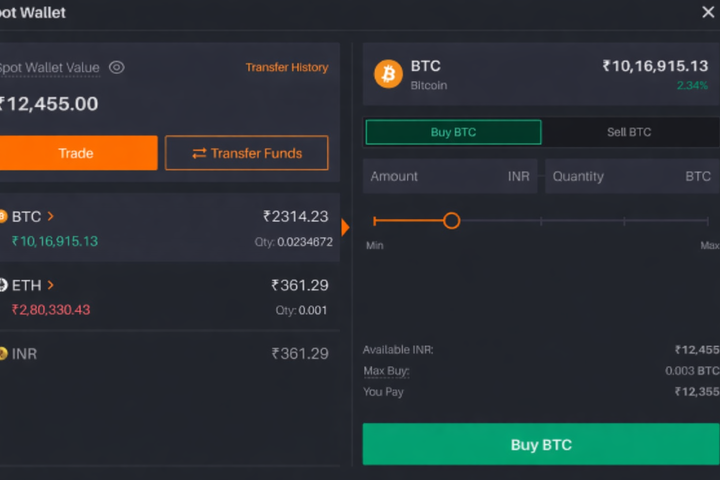
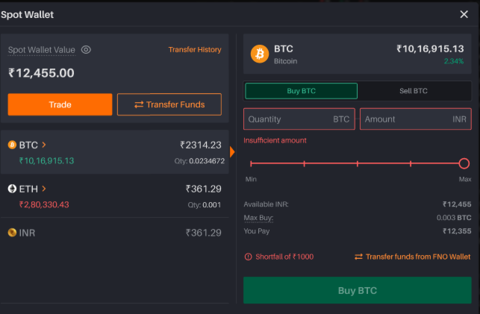
Error while placing a Buy order:-
Insufficient Balance in the Spot Wallet
This error occurs when you attempt to place a buy or sell order, but your Spot Wallet does not have enough balance to complete the transaction.
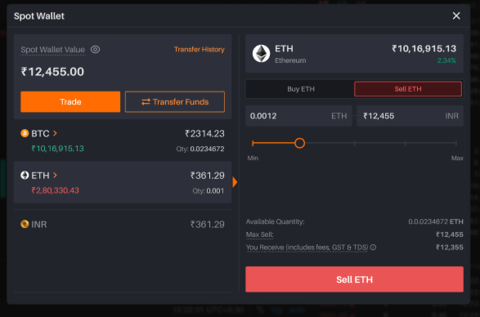
Selling Crypto on Delta India
Selling cryptocurrency on Delta India is simple and secure. However, certain rules apply to ensure fair trading and to prevent order failures. Please review the guidelines below before placing a sell order.
Eligibility to Sell Crypto
Users can sell only the crypto assets they own and that are available in their Spot Wallet. Assets that are not present in the Spot Wallet or are locked in open orders cannot be sold until they become available.
Short Selling Not Supported
Delta India does not support short selling in spot trading. This means users cannot sell crypto without holding the asset first. All sell orders must be backed by an existing balance in the Spot Wallet.
Sell Quantity Limits
The sell quantity must be equal to or less than the available balance in the Spot Wallet. If the entered quantity exceeds the available balance, the sell order will be rejected.
Important Notes
Ensure sufficient asset balance in the Spot Wallet before selling
Check for open orders that may be locking your assets
Review the entered quantity carefully before confirming the order
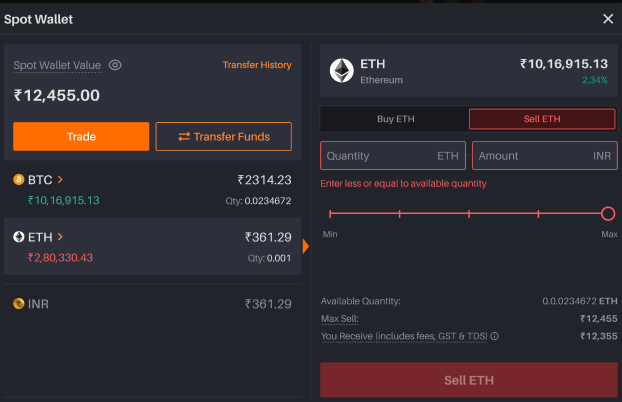
Error while selling Spot contract:-
Selling More Quantity Than Available
This error appears when you try to sell a quantity of an asset that is greater than what you currently hold in your Spot Wallet.
Spot Trading Order Limits
Minimum Order Size:
- For BTC: 0.0001 BTC
- For ETH: 0.001 ETH
Maximum Order Size:
- For BTC: 0.25 BTC
- For ETH: 5 ETH
There is no holding limit on BTC or ETH.
Was this article helpful?
That’s Great!
Thank you for your feedback
Sorry! We couldn't be helpful
Thank you for your feedback
Feedback sent
We appreciate your effort and will try to fix the article